Niagara particles
Particle bakes play back through a Niagara emitter rather than a mesh. A GPU data interface reads the baked positions and places each particle.
The quickest route: the template
Ternary VertexCache ships a ready-made Niagara System:
/TernaryVertexCache/NS_VATParticle_Template
Drag it into your level and set its User Parameters:
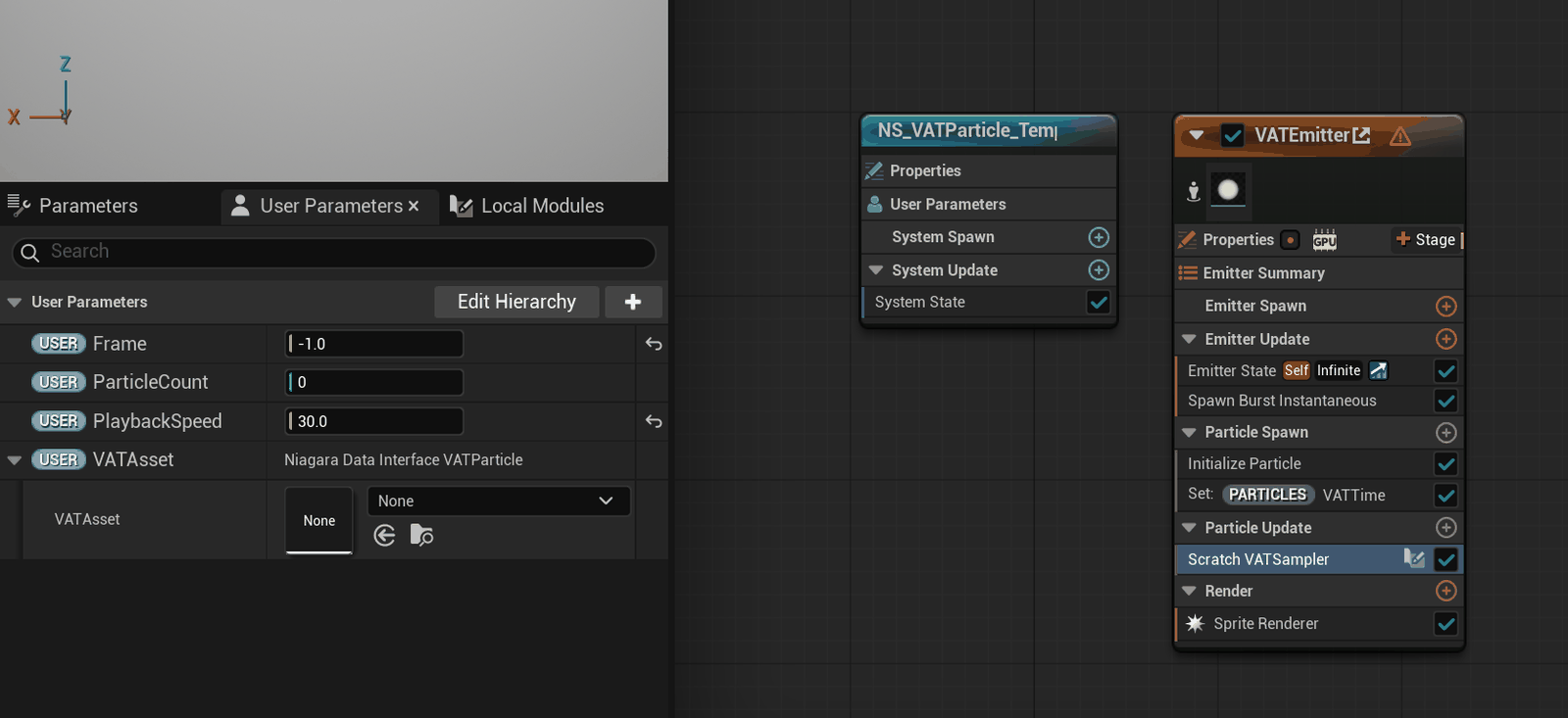
| Parameter | What to set |
|---|---|
| User.VATAsset | Your baked Particle data asset |
| User.ParticleCount | Must equal the asset's Unit Count (see below) |
| User.PlaybackSpeed | Playback rate in frames per second. Match the asset's FrameRate for native speed; negative plays in reverse. This stays the same whatever Frame Step the bake used — stepping is accounted for during playback and does not change the speed. |
| User.Frame | Manual scrub. Leave at -1 for automatic playback; set ≥ 0 to hold a specific frame. |
ParticleCount must match the asset
Open your baked data asset and read Unit Count, then set User.ParticleCount to that number. Particles are spawned on the CPU, which can't read the GPU-only data interface, so the count can't be filled in automatically. Too low and particles are missing; too high and the extra ones never appear.
Playback speed is frames per second, not a multiplier. If the bake was captured at 30 fps, set
30 for native speed, 60 for double, -30 for reverse.
Building your own emitter
If you'd rather wire it yourself, the data interface is VAT Particle Sample (category VAT), and
it is GPU only.
Frame loops internally over the bake's frame count, and negative values play in reverse.
Position is emitter-local.
The emitter needs to be:
- GPU simulation, and Local Space enabled — positions are emitter-local, so local space is what puts them at your actor's transform
- Spawn Burst Instantaneous with the count set to the asset's Unit Count, Loop Count Limit 1
- infinite particle Lifetime — every slot must stay alive for the whole loop
Then in a scratch module:
- Feed
SampleParticle's Slot fromParticles.UniqueID. - Drive Frame from a per-particle accumulator:
Particles.VATTime += Engine.DeltaTime * PlaybackSpeed. - Write the returned Position to
Particles.Position.
Hide dead slots — don't kill them
Use the Alive output to set sprite size: a Select node with Alive as the selector,
writing your base size when true and (0,0) when false, into Particles.SpriteSize.
Don't kill the particle instead. A slot that's dead at frame 0 may be alive at frame 50, and a killed particle never comes back — you'd lose particles every loop.
Namespace gotcha
The accumulator must be Particles.VATTime — in the Particles namespace on both the read
and the write. The add-parameter menu defaults to a different namespace, and if you accept it the
value silently never accumulates and nothing moves.
Before you bake
The source emitter must have Requires Persistent IDs enabled. Without it, particle identity isn't stable from frame to frame, so playback interpolates between unrelated particles. The bake warns you if it's missing — enable it and bake again.