Materials
Every VAT type plays back through a material node that reads the baked textures and moves the mesh. The nodes live under TernaryLabs Vertex Cache in the material palette (right-click the graph, or search for "VAT").
Each node refuses to compile until the material is set up correctly, and the error names the exact setting to change. That's the fastest way to get it right — wire it up, hit Apply, and follow whatever it tells you.
Setup at a glance
| Node | Textures to connect | Tangent Space Normal | Max WPO Displacement | Always Evaluate WPO | Vertex Interpolator | Also required |
|---|---|---|---|---|---|---|
| Rigid Body (Compound) | Position + Rotation | OFF | ≥ bake travel | ON | on Normal | piece index read from UV1 |
| Rigid Body (Instanced) | Position + Rotation | OFF | ≥ bake travel | ON | on Normal | PerInstanceCustomData node (index 0) → PieceIndex |
| Soft Body (both) | Position + NormalTangent | ON | ≥ bake travel | ON | on Normal and Tangent | — |
| Fluid | Position + NormalTangent | OFF | exactly 0 | ON | on Normal and Tangent | Two-Sided |
Normal and Tangent always go through a Vertex Interpolator
Every decode node's Normal output — and Soft Body's Tangent — must pass through a Vertex Interpolator before reaching the material's pins. Wire one straight into the Normal pin and the material will not compile, with an error saying so.
WPO does not need one; it is already evaluated in the vertex shader.
Two entries catch people out: Soft Body is the only one wanting Tangent Space Normal on, and Fluid is the only one wanting Max World Position Offset Displacement at 0.
Assigning the data asset
VATAsset is a property on the node, not an input pin — select the node and set it in the Details panel. Everything else the node needs is read from it, so nothing compiles until it's assigned.
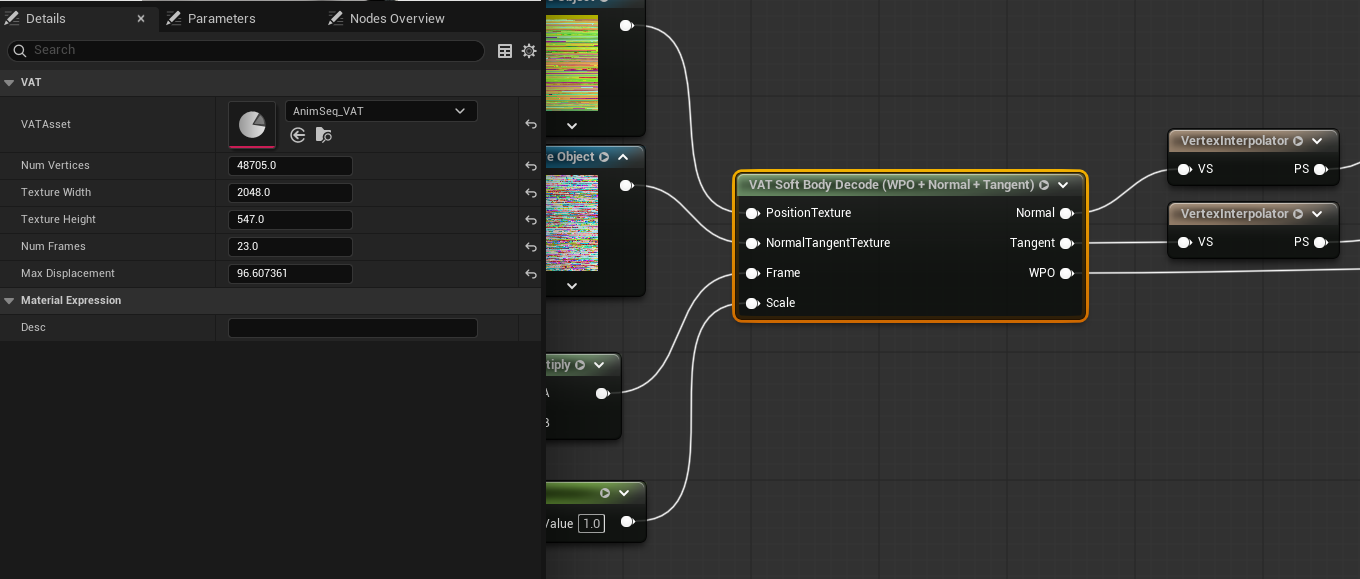
The fields below it (Num Vertices, Texture Width/Height, Num Frames, Max Displacement) fill in
automatically from the asset and are shown for reference — you don't set them by hand. UVChannel
is the exception: leave it at 1 unless you know your mesh carries the index elsewhere.
Common to every node
- VATAsset — see above. Must be assigned first.
- Frame — the playback clock. The simplest driver is Time × FrameRate (the asset's
FrameRate). Looping is internal; negative values play in reverse.FrameRateis the rate the animation was captured at, so this stays the same whatever Frame Step the bake used — the node accounts for stepping on its own and playback keeps its real-world duration. - PrevFrame (optional) — last rendered frame's value, used only to build motion vectors. Leave it unconnected when Frame is driven by Time; wire it when the frame number comes from the CPU. See Driving playback.
- Output pins are ordered
Normal, Tangent, WPOon both Soft Body and Fluid. Rigid Body has no tangent, so it isNormal, WPO. - The Tangent output is for anisotropic shading only. Connect it to the material's Tangent pin alongside a connected Anisotropy pin, or leave it unconnected. See below.
- Always Evaluate World Position Offset must be enabled on the material, or a primitive's own WPO toggle or WPO Disable Distance can silently stop the animation.
- Max World Position Offset Displacement must cover the animation's travel, or the mesh gets culled or loses shadows while its vertices are still on screen. The compile error states the number to use.
What the Tangent output does — and doesn't
Soft Body and Fluid bake a per-vertex tangent that follows the deformation. It has exactly one consumer: the direction of anisotropic highlights, for brushed, fibrous or woven surfaces.
Unreal only reads the material's Tangent pin when the Anisotropy pin is connected, on a Default Lit or Clear Coat opaque/masked material. With Anisotropy unconnected the Tangent pin is compiled away, so leaving the output unwired costs nothing.
It does not fix normal maps on a deforming mesh
The tangent basis a normal map is interpreted in comes from the mesh's own vertex buffer, and no material output can change it — World Position Offset moves vertices without updating it. So on a heavily deformed Soft Body, normal-map detail stays oriented to the rest pose. The Normal output carries the correct macro normal, which is what you actually see; only the fine detail is affected, and in practice it is rarely noticeable.
Rigid Body has no Tangent output. Not because a rotating piece wouldn't need one — its baked tangent would be as stale as its normal is without the Normal output — but because nothing has asked for it: anisotropy on fractured debris is a rare combination, and unlike Soft Body and Fluid there are no spare texture channels already paid for. If you need it, say so and it can be added. Particle has no surface to be tangent to.
Driving the Frame input
There are two ways to drive playback: a Time-based formula in the material, or a frame number
computed on the CPU and passed in through Custom Primitive Data, which is what Sequencer and
Blueprint use. They suit different jobs, and the CPU route needs the PrevFrame input wired.
Both are covered in Driving playback.
VAT Soft Body Decode
Used by Soft Body and Soft Body (Anim Sequence) bakes.
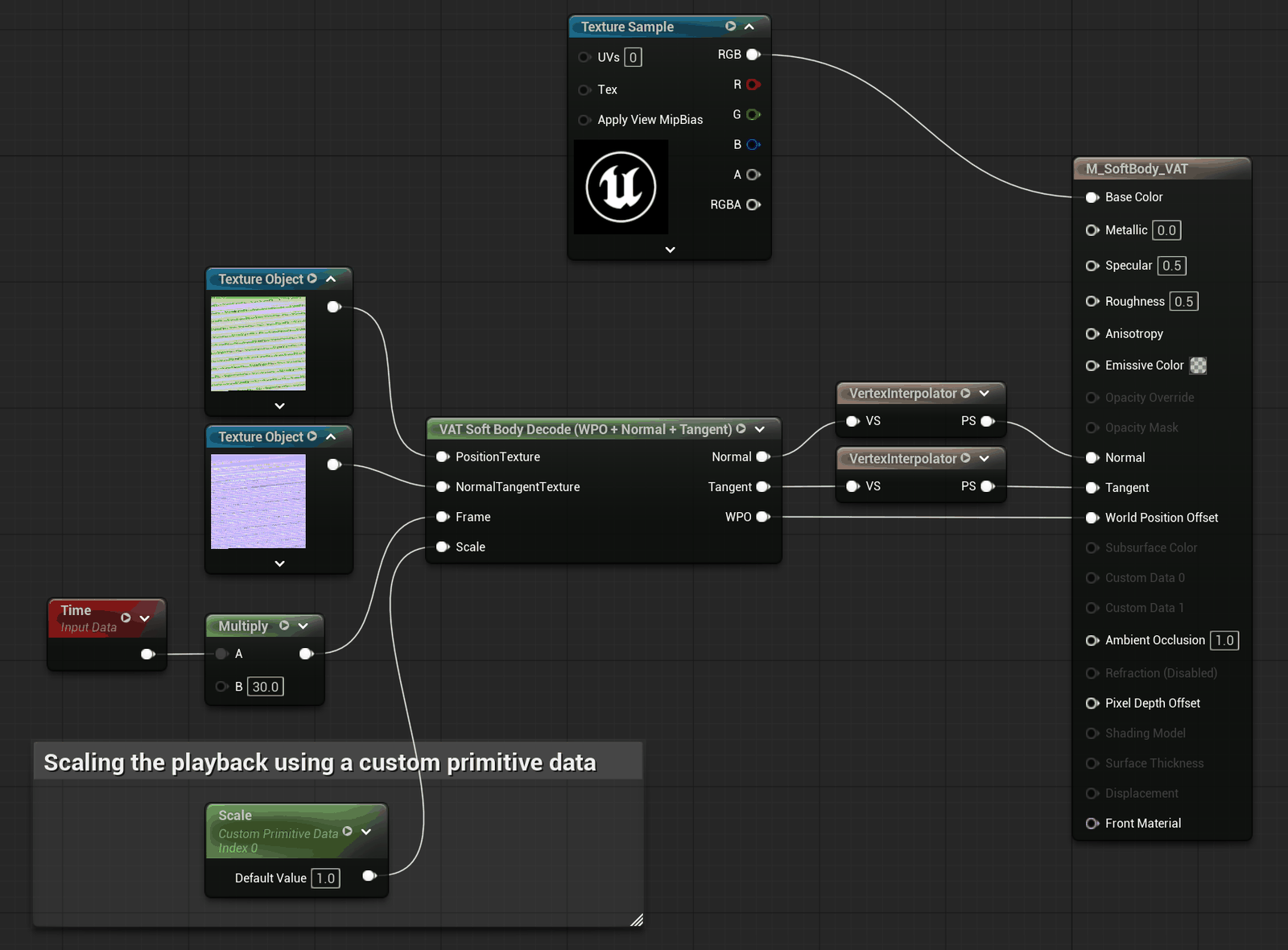
Inputs: PositionTexture, NormalTangentTexture, Frame, PrevFrame (optional), Scale (optional)
Outputs: Normal (tangent space), Tangent (world space), WPO
Properties: VATAsset, UVChannel (default 1)
Material settings: Tangent Space Normal ON; Always Evaluate WPO ON; Max WPO Displacement ≥ bake travel.
The Normal output is tangent-space, so it stays correct on back faces and under any scale.
The Scale input
An optional strength control for the whole deformation. Leave unconnected for a normal bake.
| Value | Result |
|---|---|
unconnected / 1 |
The bake as-is |
0 |
Rest pose — geometry and shading |
| between 0 and 1 | Partial deformation |
For a per-instance dial, drive it from Custom Primitive Data (as in the screenshot above) — each placed component can then set its own strength without a separate material instance.
Clamped to 1
Assigning the data asset sets the material's Max World Position Offset Displacement from the bake's own travel. Scaling above 1 would push vertices past that and cull the mesh at range, so the input is clamped — values above 1 behave as 1.
VAT RBD Decode Compound
For Rigid Body (Compound) bakes.
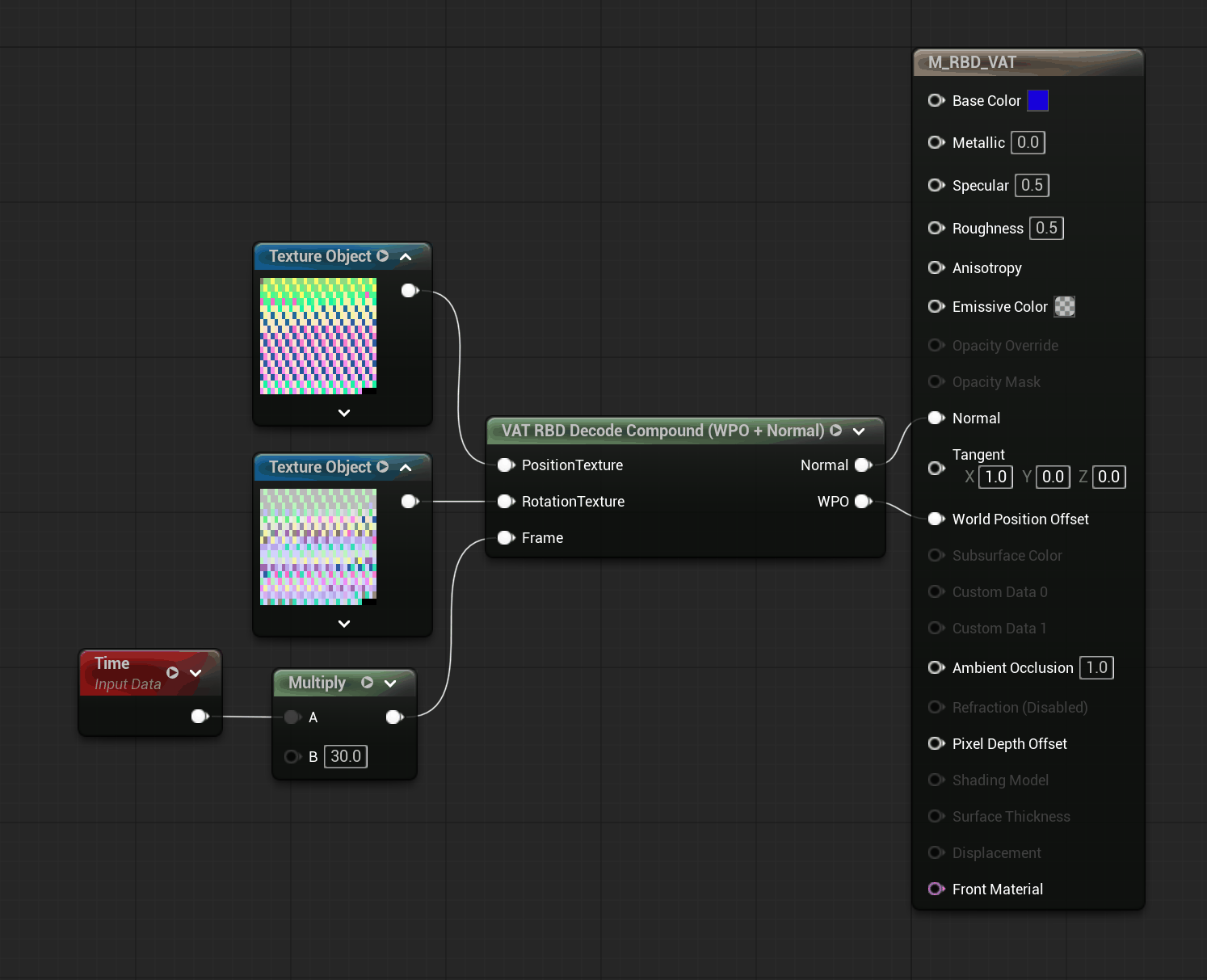
Inputs: PositionTexture, RotationTexture, Frame, PrevFrame (optional)
Outputs: Normal (world space), WPO
Properties: VATAsset, UVChannel (default 1)
Material settings: Tangent Space Normal OFF — the Normal output is world-space. Always Evaluate WPO ON; Max WPO Displacement ≥ bake travel.
Both textures must be connected; the rotation texture is what makes pieces tumble rather than just translate. The per-piece index comes from UV1 on the baked mesh automatically.
VAT RBD Decode ISM
For Rigid Body (Instanced / ISM) bakes. Same decode as Compound, but the piece index arrives per instance instead of from UV1.
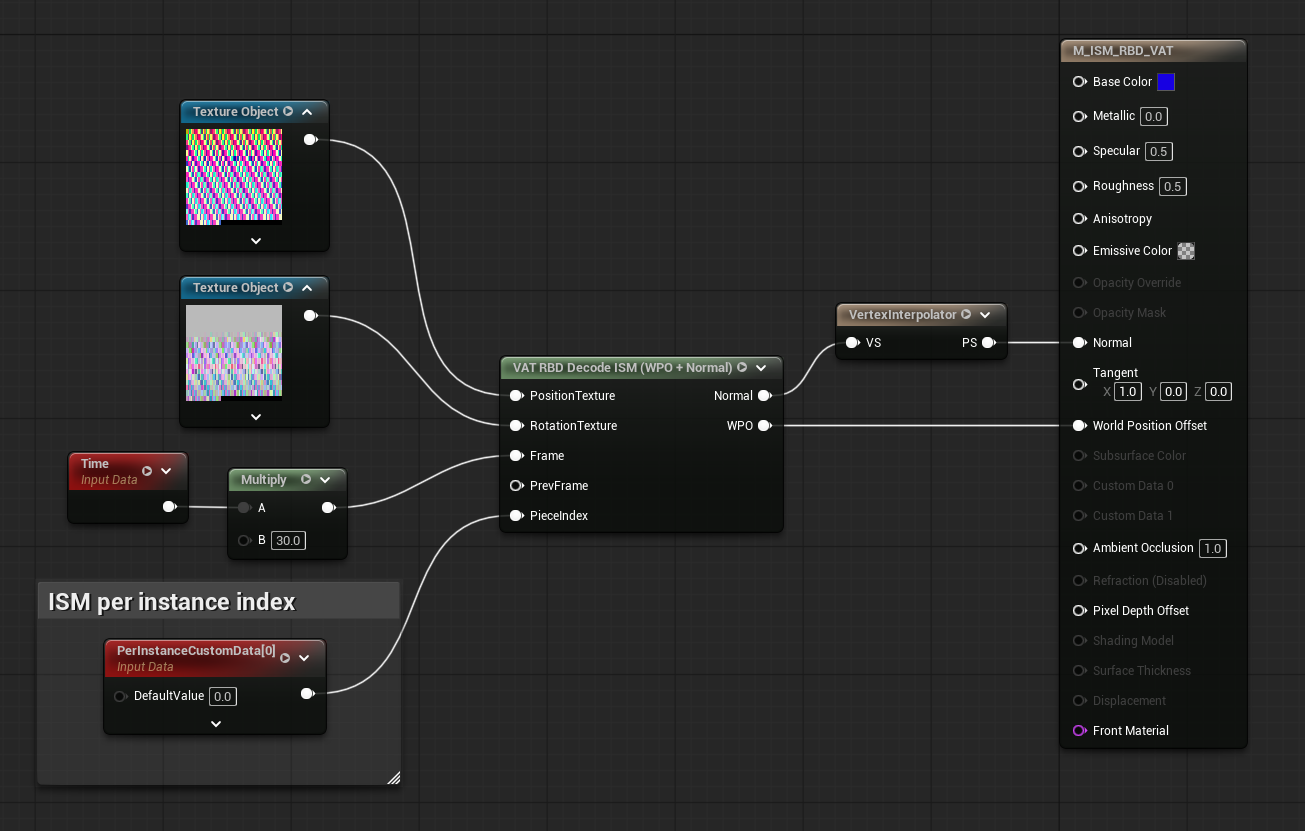
Inputs: PositionTexture, RotationTexture, Frame, PrevFrame (optional), PieceIndex
Outputs: Normal (world space), WPO
Material settings: as Compound.
PieceIndex must come from a PerInstanceCustomData node
Wire a PerInstanceCustomData node with index 0 into PieceIndex. This is not optional
and not substitutable: Unreal only uploads per-instance custom data to the GPU when that node is
actually present in the material graph. Without it the data is never uploaded, every instance
reads index 0, and all the pieces collapse onto one another.
Place the VATRBDInstancedComponent at the bake's origin — the material drives each piece out to its
own position from there.
VAT Fluid Decode
For Fluid (Geometry Cache) bakes.
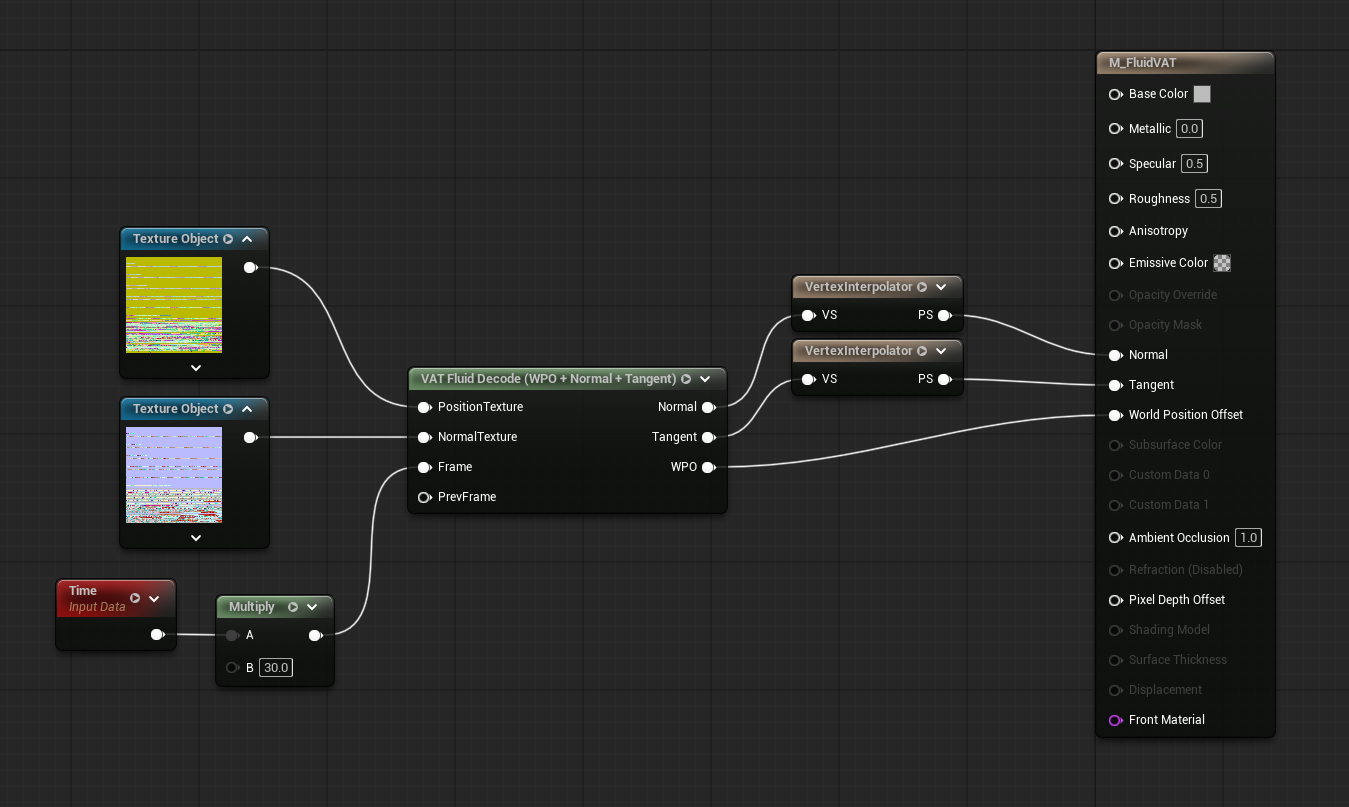
Both Normal and Tangent pass through Vertex Interpolators; WPO goes straight to the
pin. Frame is Time x 30 here, the bake's frame rate, so PrevFrame is left unconnected.
Inputs: PositionTexture, NormalTexture, Frame, PrevFrame (optional)
Outputs: Normal (world space), Tangent (world space), WPO
Material settings — these differ from every other node:
- Tangent Space Normal OFF
- Max World Position Offset Displacement — exactly
0. Triangles that don't exist on a given frame are hidden by the decode; any non-zero clamp brings them back as visible holes. Culling is handled by the baked mesh's own bounds, so nothing is lost by setting this to 0. - Always Evaluate WPO ON
- Two Sided enabled
Playback snaps to whole frames — there is no blending between them.