Bake types
Nine entries in the Animation Type dropdown. Each takes a different source and has its own material node.
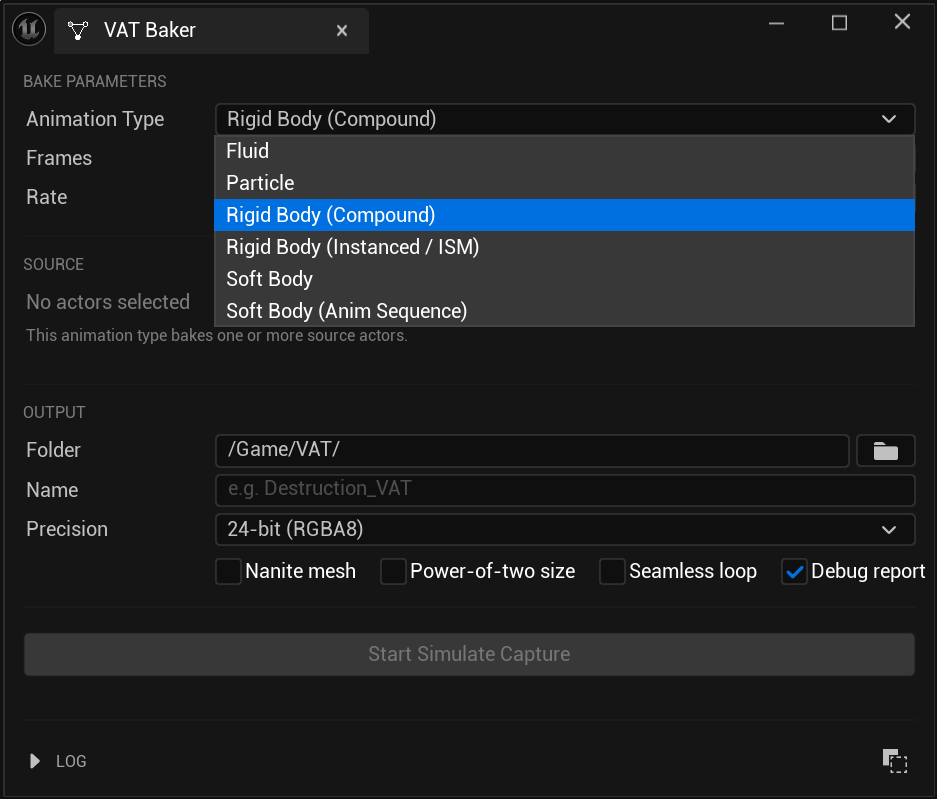
| Type | Source | Decode node | Playback |
|---|---|---|---|
| Rigid Body (Compound) | Physics actors / Geometry Collection | VAT RBD Decode Compound | One static mesh |
| Rigid Body (Instanced / ISM) | Physics actors sharing one mesh | VAT RBD Decode ISM | GPU-instanced |
| Soft Body | Skeletal mesh / Chaos cloth actor | VAT Soft Body Decode | One static mesh |
| Soft Body (Geometry Cache) | Alembic Geometry Cache asset | VAT Soft Body Decode | One static mesh |
| Soft Body (Anim Sequence) | Skeletal Mesh + Anim Sequence assets | VAT Soft Body Decode | One static mesh |
| Particle | Niagara system actor | (Niagara data interface) | Niagara emitter |
| Particle (Geometry Cache) | Alembic Geometry Cache asset | (Niagara data interface) | Niagara emitter |
| Rigid Body (Geometry Cache) | Alembic Geometry Cache asset, one track per object | VAT RBD Decode Compound | One static mesh |
| Fluid (Geometry Cache) | Alembic Geometry Cache asset | VAT Fluid Decode | One static mesh |
What every bake produces
Every bake writes a set of assets into the output path you choose, all named from your Asset Name:
| Asset | Name | Produced for |
|---|---|---|
| VAT data asset | <Name> |
every type |
| Position texture | <Name>_Position |
every type |
| Rotation texture | <Name>_Rotation |
Rigid Body |
| Normal/tangent texture | <Name>_NormalTangent |
Soft Body types, Fluid |
| Playback mesh | <Name>_Mesh |
every type except Particle |
The data asset is the one you assign in your material — it carries everything the decode node needs. The playback mesh is what you place in the level.
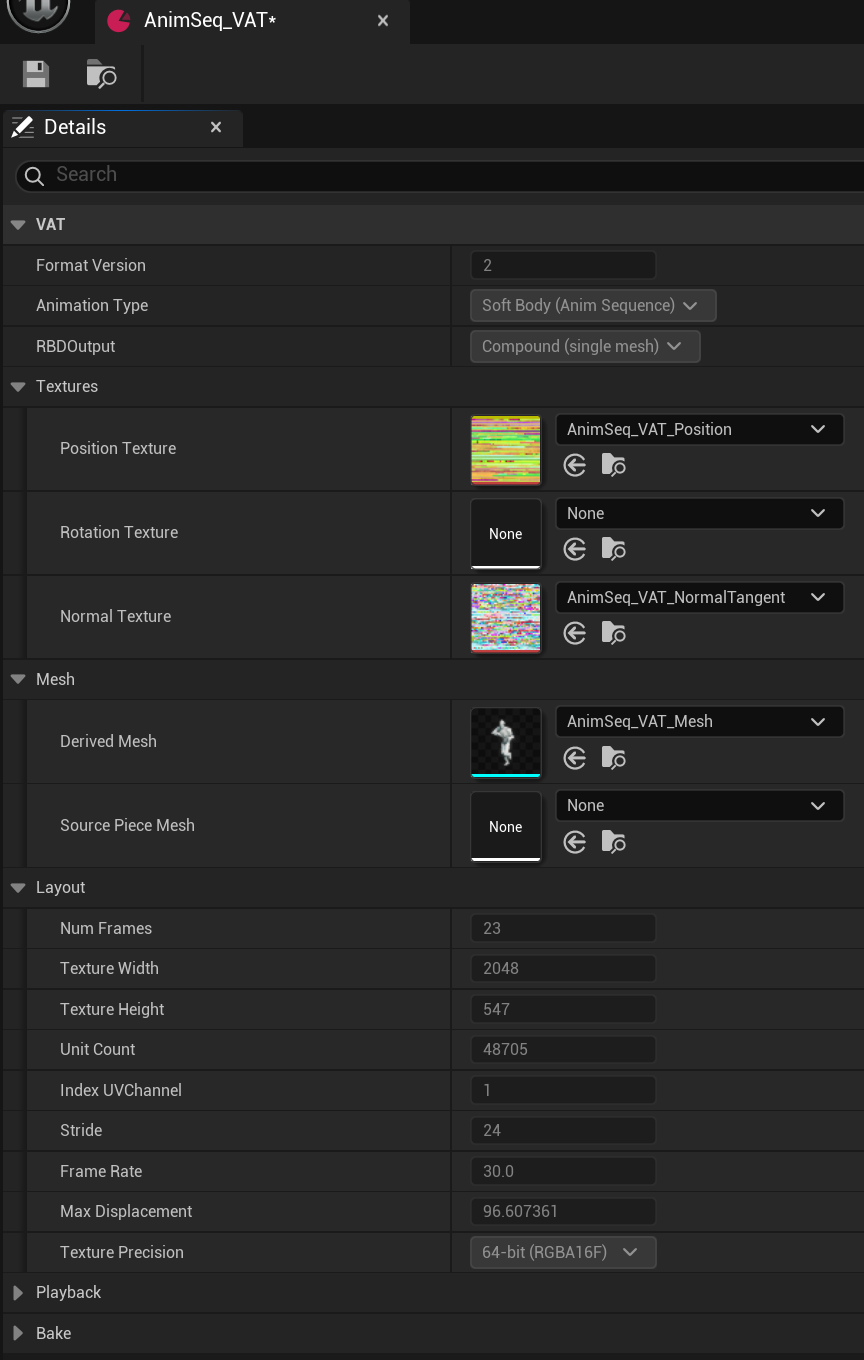
Opening the data asset shows what was baked: which textures and mesh it produced, and its layout — frame count, frame rate and Unit Count, the last of which you'll need when setting up Niagara particle playback.
Re-baking over an existing asset reuses it in place, so materials and placed actors keep working.
Rigid Body (Compound)
For fracture and destruction — anything made of pieces that move and rotate as rigid units.
Source: select one or more static mesh actors with physics enabled, or a single Chaos Geometry Collection actor, then click Use Selected.
Produces: one combined static mesh containing every piece, plus position and rotation textures.
Works with any simulation, including fractured Geometry Collections where every piece is a different shape.
Rigid Body (Instanced / ISM)
The same simulation, played back GPU-instanced: one mesh drawn many times instead of one large combined mesh. Cheaper for large piece counts.
Requires all source actors to share the same static mesh at the same scale, and at least two pieces. If that isn't true, the bake falls back to Compound and logs a warning explaining which condition failed — the bake still succeeds, it just isn't instanced.
Geometry Collections can't be instanced (their pieces are all unique shapes); use Compound for those.
Playback uses the VATRBDInstancedComponent rather than a plain static mesh component. Place it
at the bake's origin — the material drives every piece out to its position from there.
The Instanced node needs one extra wire
Its PieceIndex input must be fed by a PerInstanceCustomData node (index 0). Unreal only
uploads per-instance data to the GPU when that node is physically present in the graph, so
without it every instance reads the same piece and they all stack on top of each other.
Soft Body
For cloth and deforming skinned meshes — anything where individual vertices move independently.
Source: one skeletal mesh or Chaos cloth actor. The bake captures the simulation running in the editor, so the actor must actually animate over the frame range you set.
Captures skinning, morph targets and cloth together.
Soft Body (Anim Sequence)
An animation cycle baked straight from assets — the crowd and background-character case.
Source: a Skeletal Mesh and an Anim Sequence asset (not a level actor). The mesh and sequence must use compatible skeletons.
Unlike every other type, this never starts a play session. Each frame is sampled at an exact time, so the result is identical every time you bake it, and Start Frame genuinely seeks into the sequence.
Output is identical in form to a Soft Body bake and uses the same VAT Soft Body Decode node.
Particle
For Niagara systems — baked particle positions replayed on the GPU.
Source: one Niagara system actor.
Enable Requires Persistent IDs
The emitter must have Requires Persistent IDs enabled, or particle identity isn't stable between frames and playback will be wrong. The bake warns you if it's missing — enable it and re-bake.
Produces a position texture and a data asset only — no mesh. Playback goes through a Niagara emitter; see Niagara particles.
Particle bakes are 16-bit or 32-bit float only; the 8-bit option isn't offered.
Importing an Alembic cache
Every Geometry Cache bake depends on two import settings. Both are in the Alembic import dialog, under Geometry Cache.
| Setting | Why |
|---|---|
| Store Imported Vertex Numbers (under Advanced, off by default) | Keeps each point's original DCC id, so the bake knows a point in one frame is the same point in the next. Without it points are matched by array position, which shifts whenever the mesh is re-optimised. |
| Flatten Tracks — off | Keeps one track per object. Required for Rigid Body, which treats each track as a piece. |
| Apply Constant Topology Optimizations | Optional. Stops the per-frame re-optimisation at the source. |
Both are set at import, so a cache brought in without them needs re-importing once. The bake log always states which matching it used, so you never have to guess.
Rigid Body (Geometry Cache)
For an Alembic cache of objects that move as rigid bodies — a fracture or a debris sim exported from a DCC rather than simulated in Chaos. Each track becomes a piece, and the bake fits a rotation and a translation to it on every frame.
Source: one Geometry Cache asset. No actor, no play session.
Needs the cache imported with Flatten Tracks off — see Importing an Alembic cache. A flattened cache is one track with no pieces to find, and the bake refuses.
Read the Rigid fit residuals before trusting the result
A track that actually deforms cannot be fitted rigidly, and the bake warns rather than errors — it still produces an asset that simply moves wrongly. The residuals table in the debug report is the only thing that tells you: near 0 cm is a genuine rigid piece, a large value means bake that track as Soft Body or Fluid instead.
Produces position and rotation textures plus one compound mesh, exactly like a Chaos-sourced Rigid Body bake, and plays back through the same VAT RBD Decode Compound node.
Particle (Geometry Cache)
Every vertex of an Alembic cache becomes a particle — a point cloud exported from a DCC, or any cache you want to drive effects with rather than draw.
Source: one Geometry Cache asset. No actor, no play session.
Unlike Soft Body this accepts a cache whose point count changes: each point keeps its own slot, so the count settles at the largest in the range and frames where a point is absent leave its slot dead. All surface information is lost.
Needs Store Imported Vertex Numbers on — see Importing an Alembic cache. Without ids, points are matched by array position and swap places as the cloud changes.
Watch the size budget — use Point Stride
The same limit as every other type applies: baked frames x points must stay under
16,777,216 (see How big a bake can be). A
150,000-point cache over 121 frames is 18.1 million and will not bake.
Point Stride takes every Nth vertex, and the bake tells you which stride would fit before it captures anything. It is also a quality dial: a dense sim often looks the same at stride 4 with a quarter of the texture.
The other levers are a shorter frame range and a higher Frame Step.
Produces a position texture and a data asset only — no mesh. Playback goes through a Niagara emitter; see Niagara particles.
Soft Body (Geometry Cache)
For an Alembic cache whose mesh keeps the same topology every frame — cloth, flags, and other deforming sims. Cheaper than Fluid for the same content: one delta per vertex instead of a per-slot present flag and a container sized to the busiest frame, plus normals, tangents, LODs and loop trimming.
Source: one Geometry Cache asset. No actor, no play session.
Needs Store Imported Vertex Numbers on — see Importing an Alembic cache. Without ids the vertex count wobbles between frames and the bake refuses.
If the topology genuinely does change from frame to frame, this type refuses and names the sample where a vertex went missing — bake that content as Fluid instead.
Fluid (Geometry Cache)
For surfaces whose topology changes every frame — liquid and smoke meshes imported from Alembic.
Source: one Geometry Cache asset, picked in the panel — no actor in the level, and no play session. Multi-track caches bake the first track only.
Playback snaps to whole frames — there is no blending between frames, because the surface is a different shape each frame. Bake at a high frame rate for smooth motion.
This type is memory-hungry. For a single hero effect a Geometry Cache is often the better choice; Fluid VAT wins when you need many instances or GPU-only playback.
Fluid bakes are 16-bit or 32-bit float only. At 16-bit the surface can crack, more visibly on scaled-up actors — switch to 32-bit if you see it.
Fluid stores a per-sample tangent alongside its normal, recomputed for every frame because the mesh is a different shape each time. It costs nothing — the normal/tangent texture is four channels either way — and it only matters for anisotropic materials; see Materials. If the cache carries no UVs the bake logs a warning and the tangent falls back to an arbitrary direction.